
Quick Diagnostic Checklist
Before diving into fixes, run this 2-minute check:
1. Panel in direct sun? Even 10% shade kills 80% output.
2. Connections tight? Wiggle every connector—loose = no charge.
3. Power station ON? Sounds dumb but happens constantly.
4. Correct input selected? Some stations have multiple ports.
5. Battery already full? Check display—100% stops charging.
If basics check out, move to the seven fixes below.
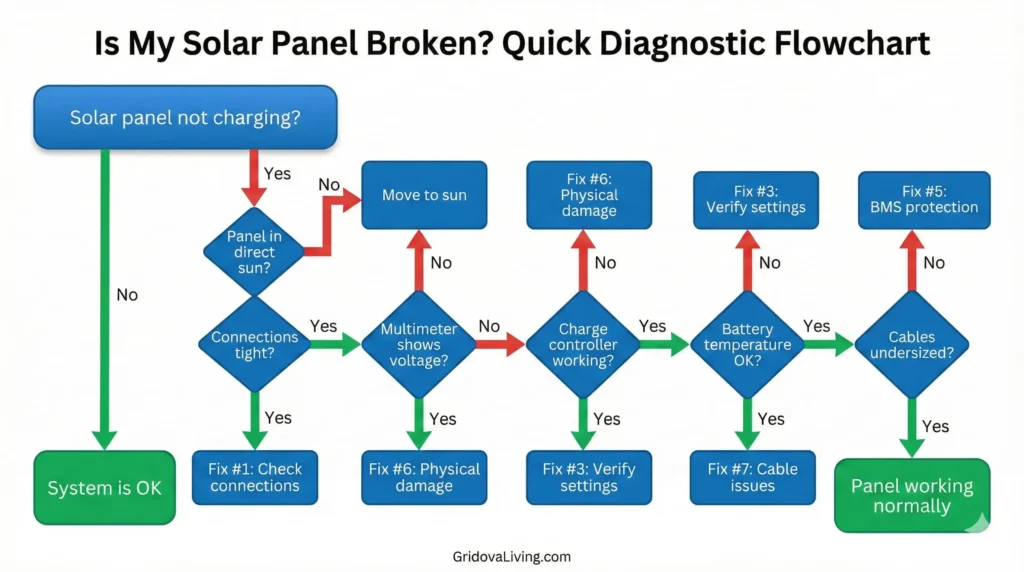
Fix #1: Check Connections (50% of Problems)
Loose or corroded connections cause half of all charging failures. MC4 connectors click when properly seated but vibration, temperature changes, and moisture loosen them over time.
What to check:
MC4 connectors: Push together until you hear/feel a click. Pull apart—should require force. If they separate easily, they weren’t connected.
Anderson plugs: Common on EcoFlow/Bluetti. These slide together but corrosion builds up. Unplug, wipe contacts with cloth, reconnect firmly.
DC barrel plugs: Cheap panels use these. They wiggle loose constantly. Wrap connection point with electrical tape for strain relief.
Adapter issues: Using MC4-to-Anderson or MC4-to-DC adapters? These fail frequently. Cheap adapters have loose internal connections. Upgrade to quality adapters or buy panel/station from same brand to avoid adapters entirely.
Clean corroded connectors with rubbing alcohol and cotton swab. Green/white oxidation blocks current flow. The TICONN MC4 connector kit includes replacement ends and crimping tools if corrosion is severe.
Fix #2: Test Panel Output with Multimeter
Eliminate guesswork. A $20 multimeter tells you if the panel works in 30 seconds.
How to test:
Set multimeter to DC voltage (20V or 200V range). Touch red probe to positive terminal, black to negative. Panel in full sun should show:
100W panel: 18-22V open circuit
200W panel: 18-22V (same voltage, parallel wired)
28W panel: 18-20V
If voltage reads correctly, panel works—problem is elsewhere (connections, charge controller, battery). If voltage is zero or under 10V, panel has internal damage.
Common test mistakes: Testing in shade gives false results. Clouds drop voltage 40-60%. Test only in direct sun between 10am-2pm for accurate readings.
The AstroAI digital multimeter ($20) is camping-friendly—auto-ranging means no fiddling with settings, and it includes alligator clips for hands-free testing.
Fix #3: Verify Charge Controller Settings
Charge controllers prevent battery damage but incorrect settings stop charging entirely. Most portable power stations have built-in controllers with automatic settings, but they occasionally fail or need manual adjustment.
Battery type mismatch: If your power station expects lithium but you somehow forced it into “AGM” or “flooded” mode (via hidden menu), charging behavior changes. Lithium charges at 14.4V max, AGM at 14.6V. Wrong setting = no charge or slow charge.
Voltage cutoff: Controllers stop charging at high/low voltage limits. If battery sits at 99%, controller may refuse additional charge to prevent overcharge. This is normal—just use some power first.
MPPT vs PWM: Standalone charge controllers (if you built DIY system) come in two types. MPPT is 20-30% more efficient and works with panel voltage mismatches. PWM requires exact voltage matching. Wrong controller = poor charging.
Check your power station manual for “solar input requirements.” Voltage and wattage must match panel specs. For complete system setup, see our off-grid inverter setup guide.
Fix #4: Rule Out Shade & Angle Issues
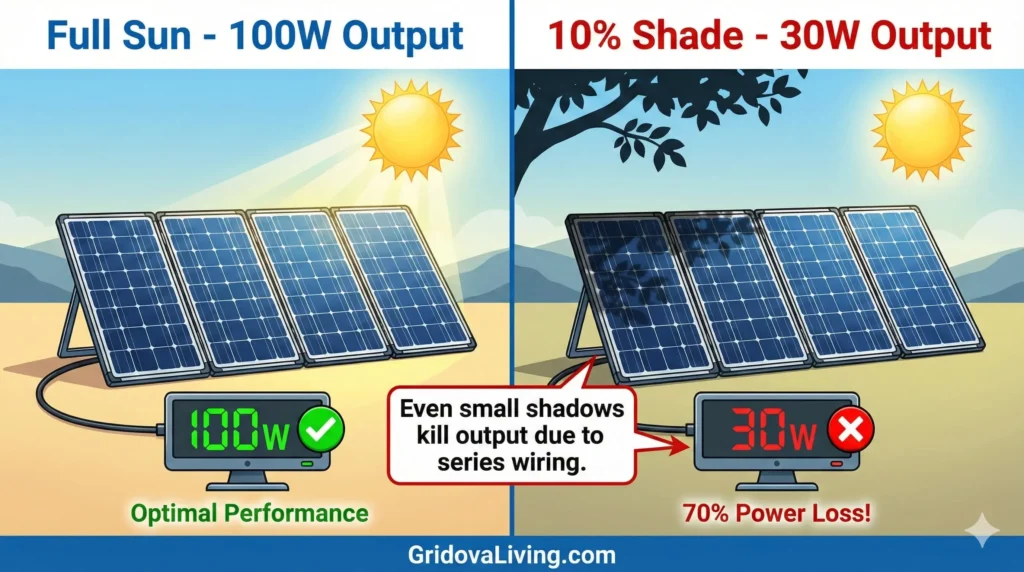
Shade is the silent killer. One small shadow—tree branch, tent corner, your shadow—kills output by 60-80% even though 90% of the panel sits in sun. Solar cells are wired in series, so shading one cell bottlenecks the entire panel.
Partial shade test: Stand between panel and sun. Output drops to nearly zero despite only blocking 5% of panel surface. Move away—output returns. This proves shade impact.
Angle matters: Panel perpendicular to sun = 100% output. Panel flat on ground = 50-70% output. Every 15° off-angle loses 8-12% power. Use adjustable kickstands to aim panel directly at sun. Reposition every 2-3 hours as sun moves.
Cloud cover: Thin clouds drop output 40-60%. Thick clouds drop it 80-90%. This is normal—not a malfunction. Wait for clear sky or accept slow charging on cloudy days.
Fix #5: Check Battery BMS Protection
Modern lithium batteries have BMS (Battery Management System) that shuts down charging if it detects problems. This protects the battery but looks like panel failure.
Over-voltage protection: If you connected incompatible panel (24V panel to 12V battery without controller), BMS detected over-voltage and shut down. Power cycle the battery—turn off, wait 30 seconds, turn on. BMS resets.
Temperature protection: Lithium batteries won’t charge below 32°F or above 113°F. If camping in cold morning or hot afternoon, battery refuses charge to prevent damage. This is normal. Wait for temperature to normalize.
Cell imbalance: After 50-100 cycles, lithium cells drift out of balance. BMS stops charging when one cell hits max voltage even if others aren’t full. Solution: Let battery discharge to 20%, then charge to 100% slowly (low wattage panel). This rebalances cells over 2-3 cycles.
For battery maintenance tips, see our solar battery storage guide.
Fix #6: Inspect Panel for Physical Damage
Physical damage is rare but catastrophic when it happens. Panels survive rough use but not everything.
Cracked cells: Look closely at solar cells—visible cracks create dead zones. Small hairline cracks (1-2mm) reduce output 5-10%. Large cracks (spanning entire cell) kill 15-20% of panel. Cracks don’t “spread” but impact is permanent. No fix except warranty replacement.
Water in junction box: Flip panel over. Unscrew junction box cover (where wires exit). Water inside = corrosion on connections. Dry thoroughly, spray with electrical contact cleaner, reassemble with silicone sealant around edges.
Bypass diode failure: Each panel has 2-3 bypass diodes (inside junction box) that route power around shaded cells. If diode fails, entire panel stops working. Test: Panel shows correct voltage with multimeter but zero current flow. Diode replacement requires soldering—most people just claim warranty.
Check warranty immediately if physical damage appears. Most panels have 1-5 year warranties. Jackery, Goal Zero, EcoFlow honor warranties without hassle.
Fix #7: Cable & Extension Issues
Long cable runs and undersized wire gauge cause voltage drop—power lost as heat in cables rather than delivered to battery.
Voltage drop formula: 10-foot cable with 5A current and 18 AWG wire loses 0.6V. 30-foot cable loses 1.8V. This matters. Panel producing 20V arrives at battery as 18.2V—barely enough to charge 12V battery through controller losses.
Cable gauge matters: Factory panel cables are 12 or 14 AWG (thick enough for 10-15 feet). Cheap extension cables often use 18 AWG (too thin). Doubling cable length requires thicker gauge—consult solar system calculator for wire sizing.
Solution: Keep cable runs under 15 feet when possible. Use 12 AWG minimum for extensions. The Renogy 10 AWG extension cable handles up to 30 feet without significant voltage drop.
Testing Panel Without Power Station
If you suspect power station is the problem, test panel independently.
Direct battery test: Connect panel directly to 12V battery (car battery works). Add charge controller between them—never connect panel directly to battery without controller or you’ll overcharge and damage battery. If battery charges, panel works fine—power station is the problem.
USB output test: Many panels have built-in USB ports. Plug phone in. If phone charges, panel produces power. This doesn’t test full output but proves panel has some function.
Open-circuit voltage test: Disconnect everything. Test panel voltage in sun with multimeter. Should read 18-22V. This is definitive—if voltage appears, panel works.
When to Replace vs Repair
Replace if:
• Panel shows 0V in full sun (multimeter test) = Dead
• Multiple cracked cells (15%+ of panel) = Not worth fixing
• Water damage with corroded internal wiring = Unsafe
• Panel older than 8-10 years and performing poorly = Degraded
Repair if:
• Connection issues = $10-30 fix
• Junction box corrosion = $0 fix (cleaning)
• Cable damage = $15-40 replacement
• Under warranty = Free replacement
Most portable panel issues are fixable. Physical damage or zero voltage are the only “replace immediately” scenarios. If replacement is needed, check our best portable solar panels guide for updated recommendations.
FAQ
Why does my solar panel charge slowly?
Slow charging usually means partial shade, poor angle, or undersized panel for battery capacity. A 100W panel takes 5-7 hours to charge 500Wh battery in ideal sun. Doubling charge time suggests shade or angle issues.
Can a solar panel work but not charge a battery?
Yes—if panel voltage is too low for battery type or charge controller is misconfigured. Panel might show 12V but battery needs 14V+ to charge through controller. Test panel voltage first, then verify controller settings match battery chemistry.
How do I know if my charge controller is bad?
Panel shows correct voltage, connections are solid, but battery won’t charge. Swap controller with known working unit or connect panel directly to battery with temporary controller. If battery charges with new controller, original is faulty.
Do solar panels stop working in cold weather?
No—panels work better in cold. Output increases 10-15% at 32°F vs 77°F. However, batteries won’t charge below freezing. Panel works fine but BMS prevents charging. Solution: Warm battery above 32°F first. More details in our winter solar panel guide.
Can I leave my portable solar panel outside overnight?
Yes, most portable panels are weatherproof (IP65-67) and handle overnight dew. However, secure them—wind blows panels away. Disconnect cables to prevent water entering ports. Long-term outdoor storage degrades panels faster than indoor storage.
What’s the lifespan of a portable solar panel?
Quality panels last 10-15 years with 1% efficiency loss per year. Budget panels last 5-8 years. Hinges and connectors fail before solar cells degrade. Proper storage and maintenance extends lifespan. See our solar panel cleaning guide for maintenance tips.

Lio Verdan writes about solar energy, off-grid living, and eco-innovation through Gridova Living — a platform dedicated to energy freedom and sustainable technology.